
research goals
Understanding what hydroponics is
Understand how each operations management work ( plant management, customer order management and distribution management) and it’s requirements
research methods
Primary research
Exploring existing digital products in the market
Case studies on how logistics function in different companies
touch points
What is hydroponics
How are plants grown
What type of plants are grown
Which equipments are used
How to attract customers
How to manage the orders
How to manage the inventory
What could be the exception cases
How to segregate the orders
How to pack and deliver the orders
Based on research we understood a hydroponic farmer’s lifestyle
Germinate
Add nutrients
Check for ambience settings
Track plant growth
Harvest
Attract audience
+
Existing Audience
Customer details
Order Placement
Stock availability
Pack order
Sell
mapping out
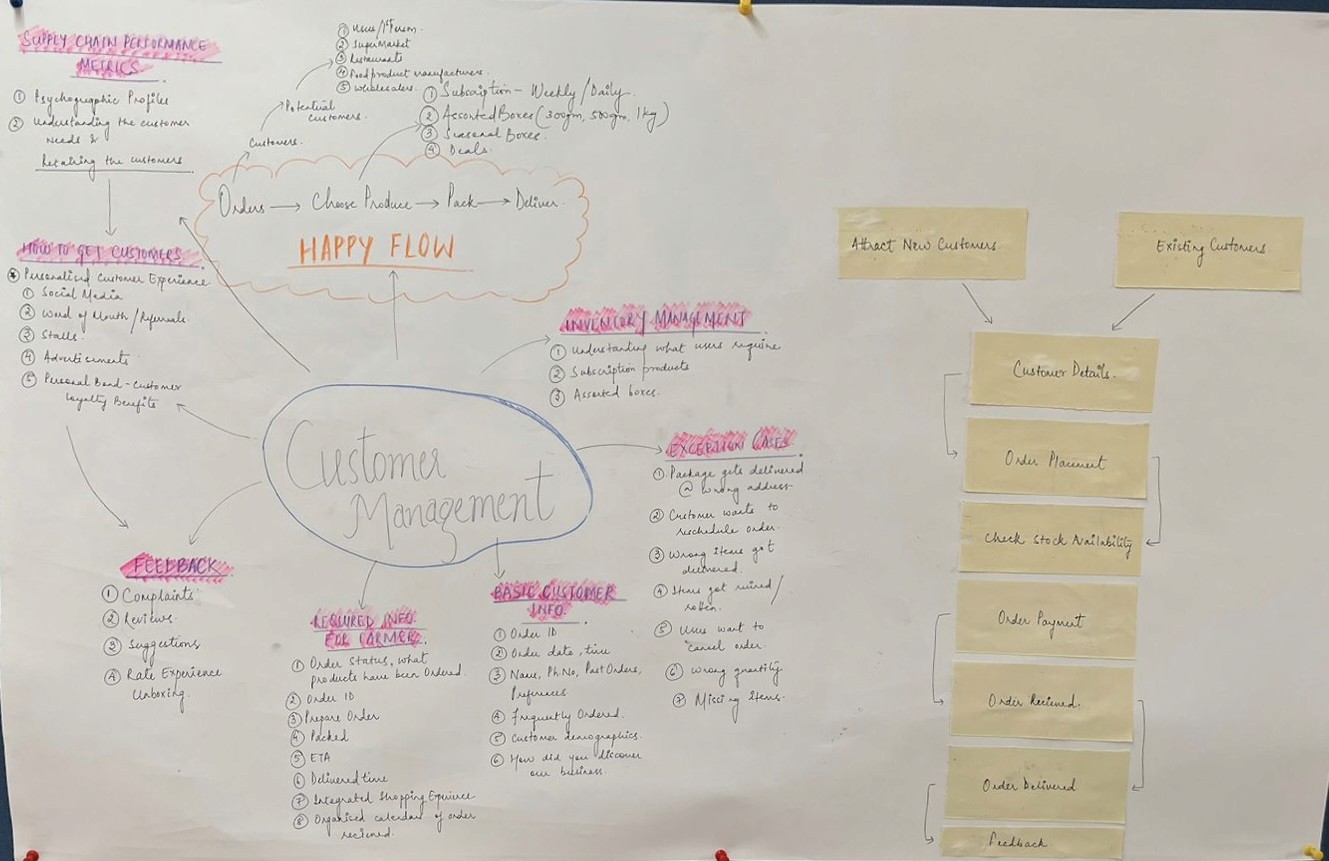
Based on our learnings we understood each operation requirements and exception cases
My focus point was “Customer order Management”
First Draft

Final Draft
user stories
In reference to our mind map user stories were curated to get a realistic, concrete and shared view of the user
Other Teams


My Team


features
Features I focused on
Order Management
Customer Order Management
Inventory Management
information architecture
Dashboard
Summary
Order ID
Summary
Summary
Order list
Bill
My Orders
Customer order management
Crop Progress
Customer
Crops
New Tasks
Contact info
Shelf life
Calender View
Location
Inventory
New Orders
Order
Packing
Inventory
Order date
My crops
Delivery date
Harvest
Order status
Delivery status
Mode of payment
Track delivery
Frequently Bought
Highest order rate region
Add a plant
Order Management
Inventory Management
Hydroponics Management
skeleton explorations
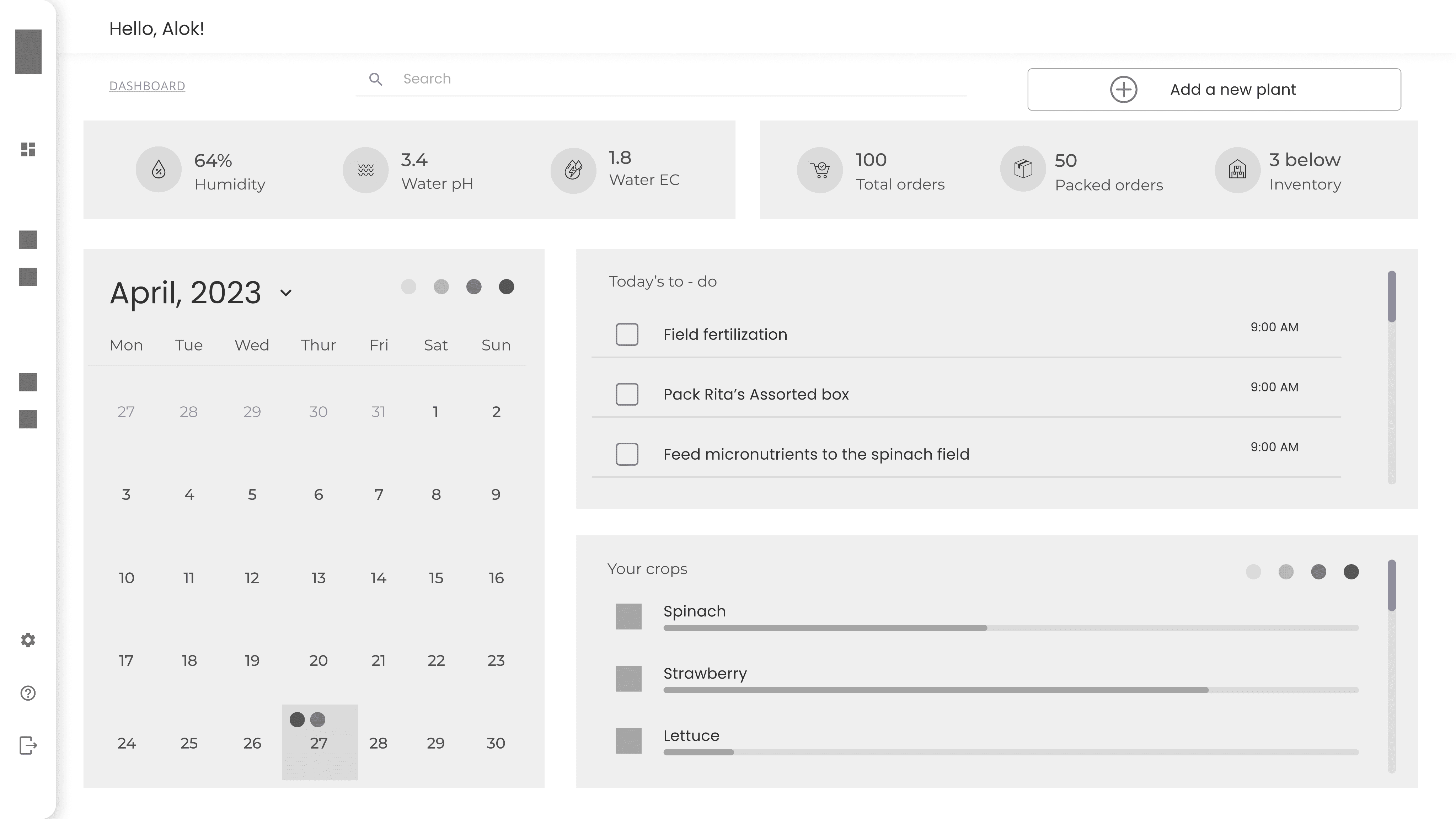
Ideations were explored based on colour, layout, content and more




final design
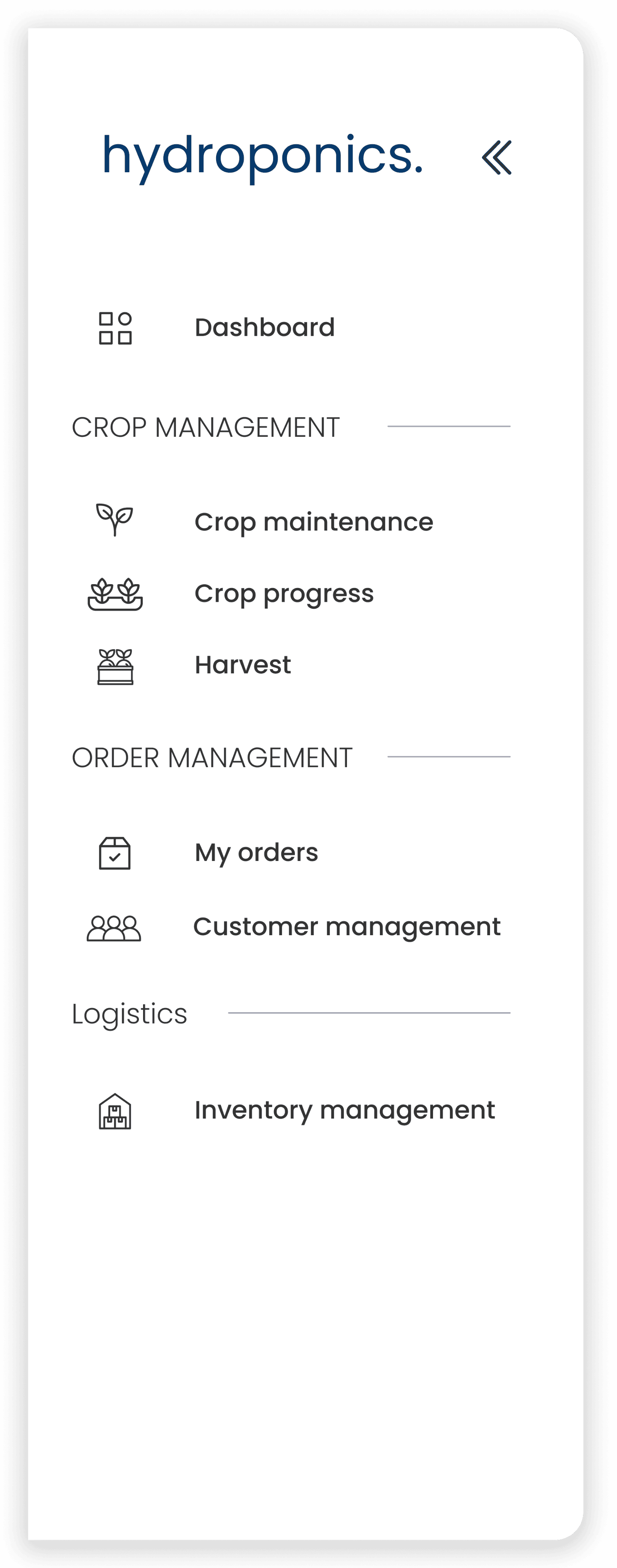
Hamburger menu, slide in - slide out design. This helps in creating more room for content!


Dashboard Interface

1
2
3
4
5
6
7
8
9
10
11
1
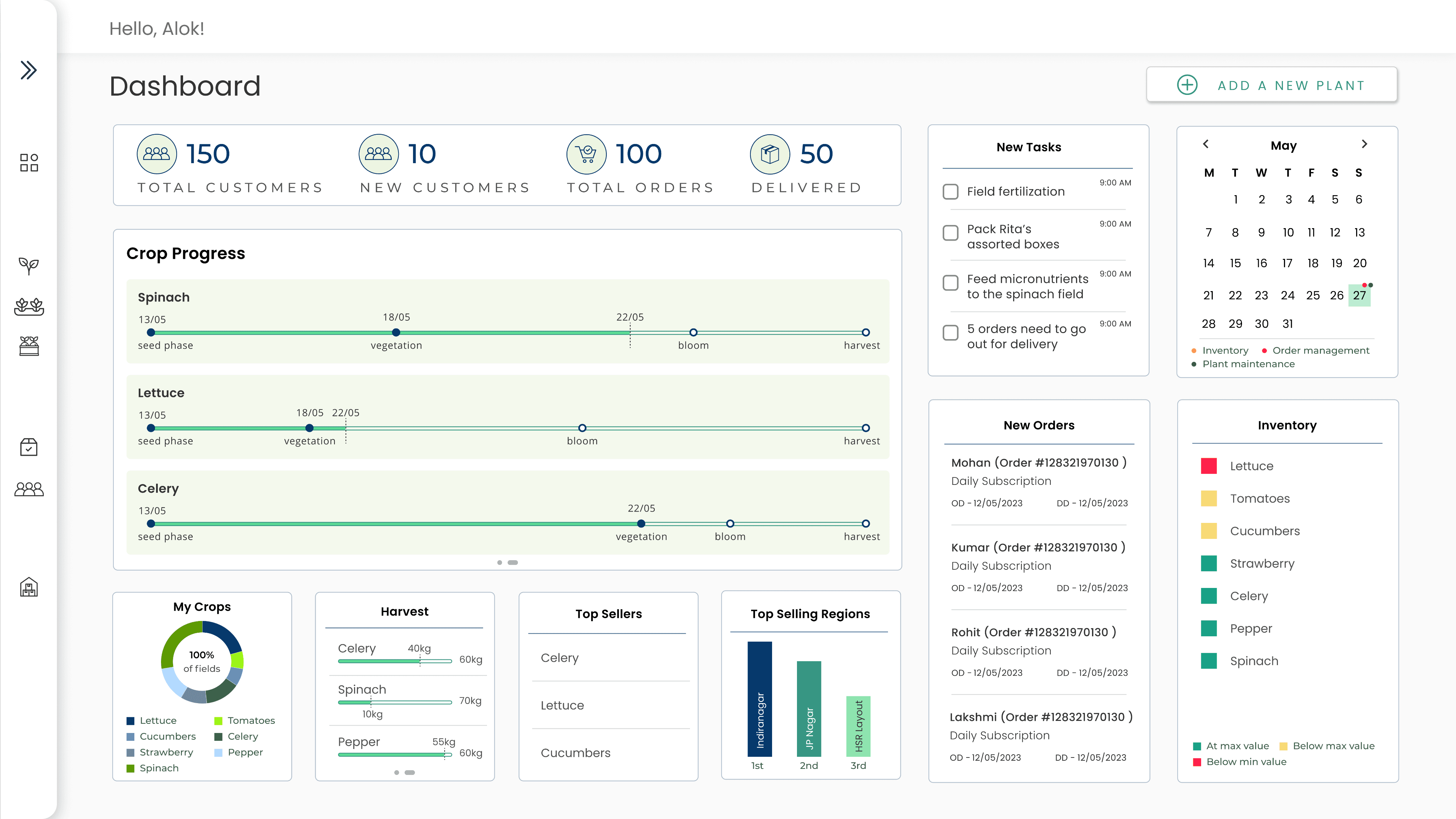
Summarized view of order and customer order management
2
Crop progress - it provides the farmer with an understanding of the crop's growth, estimated duration for the upcoming stages (such as vegetation, blooming, and harvesting), the dates on which the crop achieved each stage, and the current progress of the crop
3
My Crops - a visual depiction of the extent to which the farmer has utilized the field and the types of crops that have been planted on it
4
Harvest - a graphical representation of the crops that are currently being harvested or will be harvested in the future, including information such as which crop is being harvested, the potential yield, and how much of it has already been harvested
5
Top Sellers - the produce that is currently being purchased by the majority of the farmer's customers
6
Top Selling Regions - the regions from which the majority of the orders are received
7
New Tasks - the activities that the farmer needs to complete on a particular day
8
Calender View - the current date will be preselected as the default, and the dots above the date will be color-coded to indicate which task needs to be completed on that particular day
9
Add a new plant (button) - this should lead you to crop management page
10
Inventory - for each type of produce, there is a minimum and maximum value, and this widget is color-coded to represent the availability of inventory for a specific crop
11
New Orders - orders received on that day,
OD - Order date, DD - Delivery date
My Orders Interface

1
2
3
1
Summarized view of order management and produce of the month
2
A list of all the orders, containing details such as the order ID, customer name, type of order (assorted box, daily subscription, weekly subscription), order date, estimated delivery date, and order status (active, cancelled, rescheduled). Once the order is delivered, the box next to the customer's name will be automatically marked as checked and pushed down in the list
3
When an order is chosen from the left column, a comprehensive view of the order is displayed on the right describing customer’s demographics, estimated delivery date, type of order and its contents with quantity, price and it’s total value, order ID, a visual representation of order’s progress.
If the farmer wishes to keep a copy of this order he can download the order by clicking on “download bill”

In case the farmer is unable to fulfill an order, they can either reschedule or cancel the order by clicking on the dropdown button

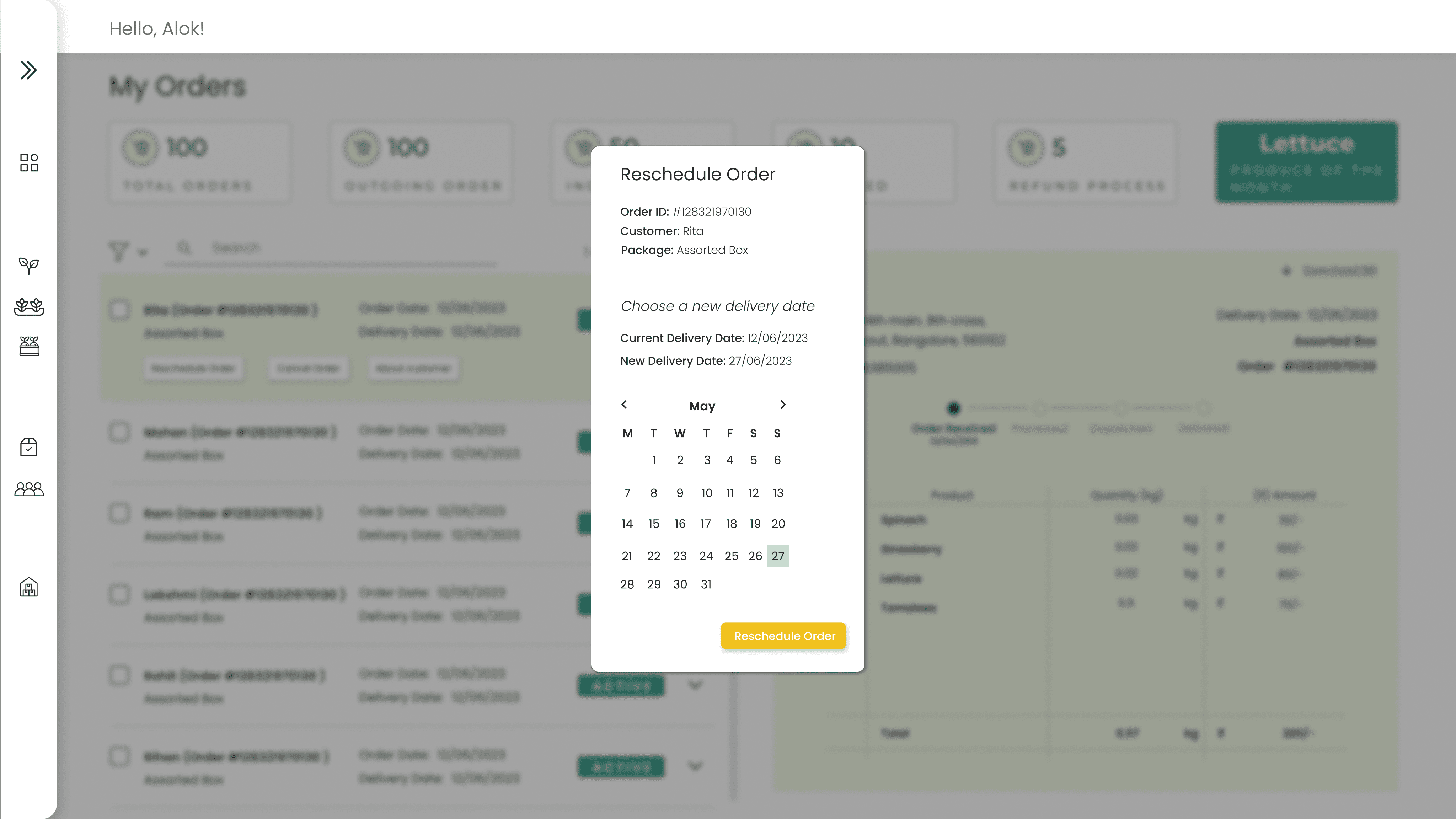
When the farmer cancels or reschedules an order, the order status is automatically updated
active
cancelled
OR
rescheduled


Customer Order Management Interface

1
2
1
Summarized view of customer order management and frequent buyer
2
A roster of all the customers, including their demographics and order details such as order ID, order type, order date, estimated delivery date, order status, delivery status, and a link for tracking the delivery

Inventory Management Interface
1
2
1
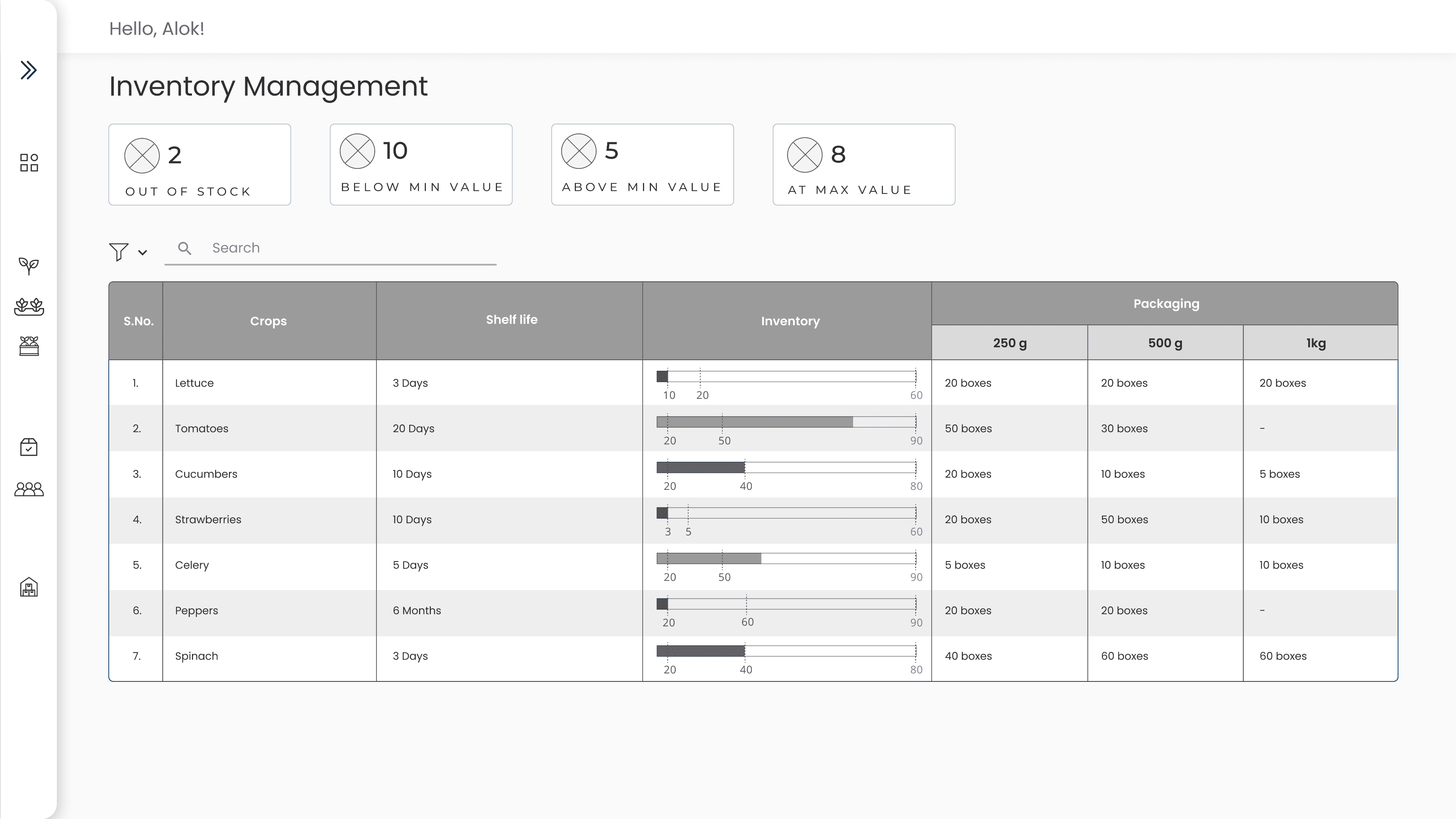
Summarized view of the inventory
2
The table provides information about a crop's shelf life, which indicates how long it can be stored before distribution. It also displays inventory details, including a visual representation of the available produce for each crop. Each crop has a minimum and maximum level of inventory that should be maintained, and this graph is color-coded to indicate when the inventory is below the minimum value (red), below the average value (yellow), and at the maximum value (green). Additionally, information about the availability of produce for making different weighted boxes is also provided under "Packaging."

Critical junctures for operation management
Crop Management
Customer Order Management
Distribution Management
introduction
The brief of this project was to gain an understanding of the different teams that would be necessary for a hydroponic farmer to initiate a small business.
The outcome of this project is to to develop a lightweight, focused, domain specific, application that caters to the need of the small scale commercial urban farmer for better managing his operations.
Reflection
This project allowed me to gain valuable insight into how a hydroponic entrepreneur manages the sale of their produce, understand in depth the user’s purchasing journey and potential challenges, explore how the owner can efficiently handle orders and inventory, and learn ways to maintain customer relationships while identifying their preferences and interests.
Lastly, throughout the process, I learned to take peer and user feedback, and guidance from Professors and Industry experts, towards building a complete product.